Why Pages Aren't Indexed by Google: A Real SEO Case Study from Search Console
Real Google Search Console data reveals 10 reasons pages aren't indexed. Learn which exclusions are harmless and which require urgent SEO action.

When a website owner sees hundreds of pages excluded from Google's index in Search Console, the instinct is either to panic or ignore the data entirely. Both responses miss the critical nuance that separates a well-functioning technical SEO setup from a site silently hemorrhaging search visibility.
This case study analyzes real Google Search Console Page Indexing data showing 592 excluded URLs across ten distinct exclusion categories. Each category has a different cause, a different risk level, and requires a different response. Understanding the full picture is what separates SEO guesswork from data-driven diagnosis.
Quick reference — the real data analyzed in this case study:
| Exclusion Reason | Pages Affected | Risk Level |
|---|---|---|
| Alternate page with proper canonical tag | 212 | Low–Medium |
| Discovered – Currently not indexed | 135 | Medium–High |
| Crawled – Currently not indexed | 69 | High |
| Page with redirect | 104 | Low–Medium |
| Excluded by 'noindex' tag | 34 | Medium |
| Not found (404) | 25 | Medium |
| Server error (5xx) | 1 | High |
| Blocked by robots.txt | 4 | Low–Critical |
| Redirect error | 2 | High |
| Blocked due to other 4xx error | 1 | High |
| Total excluded | 587 | — |
What "Pages Not Indexed" Actually Means
Direct answer: Pages not indexed by Google are URLs the search engine has discovered but chosen not to include in its searchable index, for reasons ranging from deliberate SEO configuration to technical failures. Only indexed pages can appear in search results.
Google's crawl, render, and index pipeline works in distinct stages:
- Discovery: Google finds a URL via sitemap, internal links, or external links
- Crawling: Googlebot fetches the page content and HTTP headers
- Rendering: Google processes JavaScript and assembles the final DOM
- Indexing decision: Google decides whether the URL deserves a place in its index
- Ranking: Indexed pages compete for positions in search results
Exclusions happen at the crawling or indexing stages. The exclusion reason tells you exactly where the process broke down—and whether you caused the breakdown intentionally or accidentally.
The key distinction every SEO specialist must make is between website-controlled exclusions (canonical tags, noindex, robots.txt, redirects) and Google-controlled exclusions (Discovered/Crawled – not indexed). The first group is your deliberate SEO architecture at work. The second group is Google's judgment about your content's index-worthiness.
For the full picture of how search engines work, understanding this pipeline is foundational to diagnosing indexing problems accurately.
Website-Controlled Exclusions
These exclusions happen because you — or your CMS — instructed Google not to index the URL. The question is whether every exclusion in this group was intentional.
1. Alternate Page with Proper Canonical Tag (212 pages)
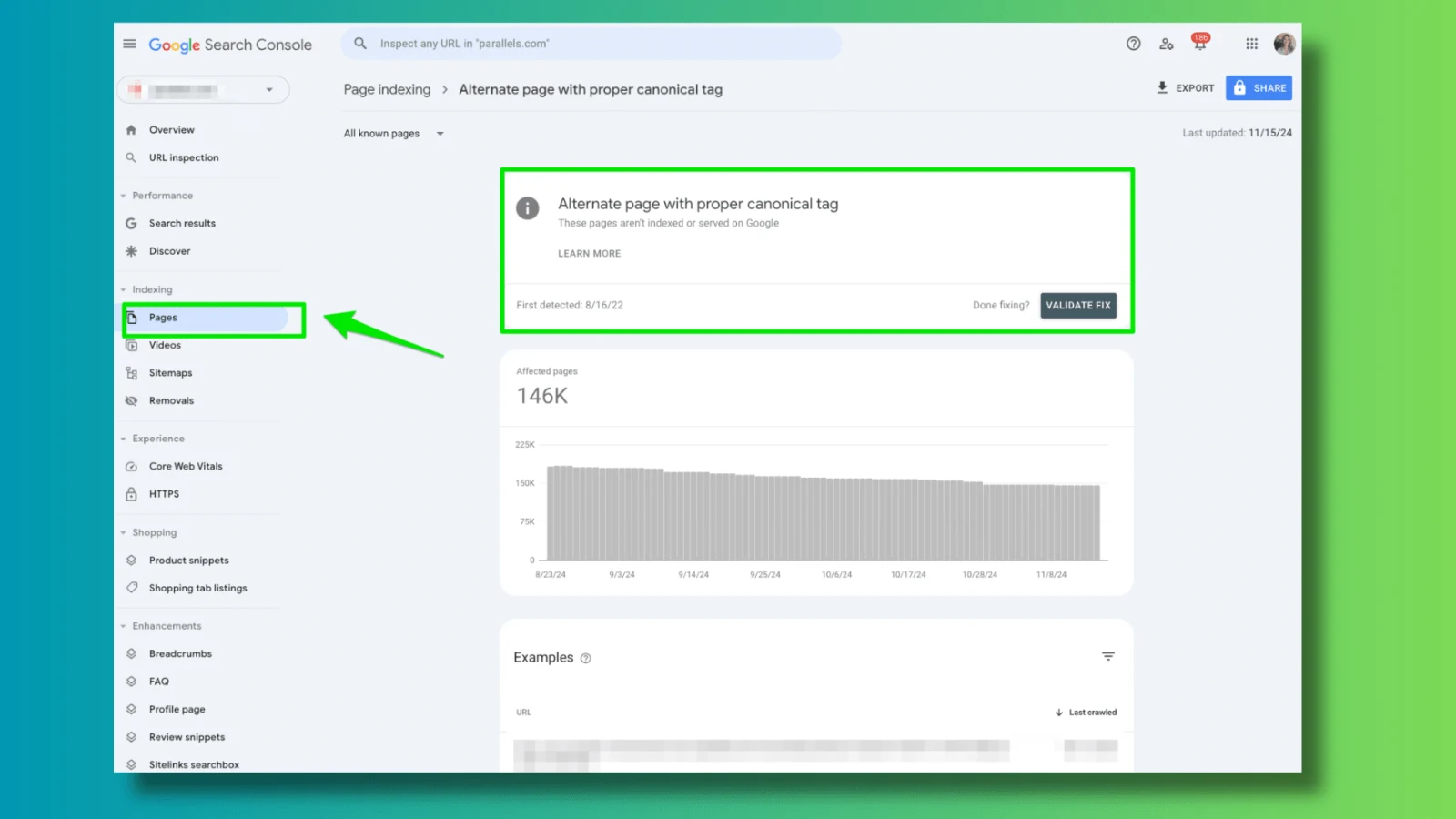
This is the largest exclusion category in the dataset and the most widely misunderstood. With 212 pages receiving this status, it is also almost certainly operating correctly for the majority of them.
What it means: Google crawled these URLs, found a rel="canonical" tag pointing to a different URL, respected that instruction, and excluded the alternate from indexing. The page is not ranked from this URL — all signals flow to the canonical destination instead.
Why 212 pages is unsurprising for most sites:
A site with multi-category content, tracking parameters, or pagination naturally generates many canonical alternates. Each of these URL types correctly produces this status:
/category-a/articleand/category-b/article(both canonical →/article/)/article/?utm_source=email(canonical →/article/)/article/?page=2(canonical →/article/)http://example.com/page(canonical →https://example.com/page)
When to act: Cross-reference these 212 URLs against your XML sitemap. Any URL appearing in both your sitemap and this exclusion list signals a contradiction — you are simultaneously telling Google to index the URL (via sitemap) and not to index it (via canonical). Resolving this contradiction is the highest-priority action for this exclusion type.
For comprehensive analysis of this status, see our dedicated guide on alternate page with proper canonical tag, and our deep-dive on Google ignoring canonical tags.
2. Page with Redirect (104 pages)
104 redirected URLs appearing in Search Console indicates Google discovered and attempted to crawl these URLs but found they forward elsewhere. This is a moderately sized and frequently mismanaged category.
Why redirected pages stay in reports:
Search Console continues reporting URLs it has previously crawled regardless of their current status. A 301 redirect implemented six months ago will appear here until Google stops prioritizing recrawling that URL — which can take months depending on crawl frequency.
The real SEO risk — internal links pointing to redirected URLs:
A redirected URL itself is not harmful. What is harmful is internal links throughout your site continuing to point to the old URL. Each redirect hop loses approximately 15% of link equity and adds latency to the page load. At scale, hundreds of internal links pointing to 301-redirected URLs represent measurable ranking suppression across the linked pages.
Redirect chain risk:
The worst scenario is redirect chains — where URL A redirects to B, which redirects to C. Google may abandon following chains beyond two hops, meaning your final destination URL may receive no link equity from content pointing to URL A.
Action required: Audit all 104 redirect URLs as internal link destinations. Where internal links point to redirected URLs, update them to point directly to the final destination. Review whether any of these are redirect chains requiring consolidation.
3. Excluded by 'noindex' Tag (34 pages)
34 pages carrying a meta name="robots" content="noindex" directive represent one of the most dangerous exclusion categories when the noindex is unintentional — and one of the most common developer collaboration failures in custom website environments.
Intentional noindex (expected exclusions):
- Thank-you pages after form submissions
- Admin or account dashboard pages
- Staging content pages not ready for indexing
- Paginated pages beyond a depth threshold
- Thin utility pages (calculators, tools with no standalone value)
Accidental noindex (critical failures):
The most common accidental noindex patterns in production:
<!-- Template-level error: noindex applied to entire site -->
<!-- Staging robots rule leaked to production -->
<meta name="robots" content="noindex, follow">
<!-- On important category or service pages -->
<!-- CMS default: new pages shipped as noindex, never changed -->
<!-- WordPress: "Discourage search engines" left checked -->
<!-- Drupal: "Published but not indexed" status applied broadly -->
Diagnostic approach: Review all 34 noindex pages immediately. Verify whether each exclusion was deliberate. Pay particular attention to any category pages, service pages, or important content pages — these should virtually never carry noindex tags. For patterns to watch, see our guide on why Google deindexed blog posts.
4. Not Found (404) Pages (25 pages)
25 pages returning 404 status indicate URLs Google has in its records that no longer serve content. Some 404s are entirely normal and acceptable; others represent active SEO damage.
The soft 404 vs hard 404 distinction:
A hard 404 correctly returns HTTP status code 404 for a URL that should not exist. This is clean and appropriate for deleted content with no replacement.
A soft 404 returns HTTP status code 200 while serving content saying "page not found" — this is an indexing problem. Google may index the soft-404 page as real content, or may choose not to index it as low-quality content, but either outcome is worse than a proper 404.
When 404s cause active harm:
The damage from 404 errors comes from internal links pointing to them. Every internal link to a 404 URL sends crawlers down a dead end, wastes crawl budget, and passes no link equity to any destination. With 25 known 404 URLs in Search Console, there may be dozens of internal links pointing to dead pages throughout the site.
Fix approach: For each 404 URL, determine whether it represents deleted content with a logical successor (redirect to successor), deleted content with no successor (leave as 404, but remove internal links pointing to it), or a URL that should still exist but is returning 404 due to a technical error (fix the underlying error). Full guidance in our 404 error fix guide.
5. Blocked by robots.txt (4 pages)
Four pages blocked by robots.txt appears small but represents a nuanced risk: if any of these four URLs are important, the damage is severe.
The critical distinction — robots.txt blocks crawling, not indexing:
This is one of the most misunderstood points in technical SEO. A robots.txt block prevents Googlebot from crawling the URL. However, Google can still know the URL exists through links from other pages, and may even index it based on anchor text from those links alone — producing a blank-snippet search result with no page content accessible.
# robots.txt
User-agent: Googlebot
Disallow: /important-page/
# Result: /important-page/ may appear in search results
# with "A description for this result is not available."
# Because Google knows the URL exists via links, but can't crawl it.
When to use robots.txt correctly:
Robots.txt is appropriate for blocking JavaScript files, CSS, internal search result pages, admin URLs, and other resources where you want to save crawl budget without affecting indexation. It is not appropriate for pages you simply want to exclude from the index — use noindex tags for that purpose instead. Review proper robots.txt configuration to ensure these four blocked pages are genuinely appropriate to block.
6. Redirect Error (2 pages)
Two redirect errors indicate URLs with broken redirect implementations — the redirect exists but leads somewhere invalid.
Common redirect error causes:
- Redirect pointing to a destination URL that itself returns 404
- Redirect loop: URL A → URL B → URL A (infinite loop)
- Malformed redirect destination URL (syntax error)
- Server-side redirect configuration pointing to non-existent resource
- Redirect chain exceeding server limits
SEO impact: Redirect errors waste crawl budget on URLs that can never resolve to content. Any link equity flowing through the broken redirect chain is lost entirely. Address these two pages immediately using our guide on redirect chain problems.
7. Blocked Due to Other 4xx Error (1 page)
One page returning a 4xx error other than 404 indicates an access or authentication problem preventing Googlebot from crawling the URL.
Common non-404 4xx codes affecting SEO:
| Status Code | Meaning | Cause |
|---|---|---|
| 401 Unauthorized | Authentication required | Password-protected page Googlebot can't access |
| 403 Forbidden | Access denied | IP-based blocking accidentally including Google's crawlers |
| 410 Gone | Permanently deleted | Deliberate permanent deletion signal |
| 429 Too Many Requests | Rate limiting | Server rate-limiting Googlebot during crawl |
For a URL that should be publicly accessible, any 4xx error other than 404 suggests a server configuration error. Investigate using our guide on diagnosing server response issues.
8. Server Error (5xx) (1 page)
One page returning a 5xx server error appears minor in this dataset, but server errors have outsized impact on long-term crawl trust relative to their frequency.
Why even isolated 5xx errors matter:
Google builds a model of a website's reliability based on crawl history. A page that returns 500 (Internal Server Error) or 503 (Service Unavailable) during Googlebot's visit receives reduced crawl priority in subsequent visits. If the error is persistent, Google may stop attempting to crawl the URL and eventually remove it from the index even if the page later begins returning 200.
For a news website or high-volume content platform, even temporary server errors affecting a URL during a critical indexing window can mean the content never achieves peak traffic during its relevance window. Diagnose and resolve server errors using our server response guide.
Google-Controlled Exclusions
These two categories are where Google made an independent judgment about whether to index the URL — and decided not to. They have no simple technical fix because the root cause is Google's assessment of the content's value or crawl priority.
9. Discovered – Currently Not Indexed (135 pages)
135 pages in "Discovered – Currently Not Indexed" status represents the second-largest exclusion category in this dataset. This status means Google knows these URLs exist but has not yet crawled them — let alone made an indexing decision.
Why Google discovers but delays crawling:
Google allocates crawl budget based on a site's perceived authority, update frequency, server response speed, and content quality history. When more URLs are discovered than the allocated crawl budget can process promptly, lower-priority URLs enter a queue.
A large "Discovered" count relative to total site size indicates one or more of these conditions:
- Crawl budget constraint: The site has more discoverable URLs than Google's current budget covers regularly
- Low internal link priority: Discovered URLs lack strong internal linking from important pages
- Sitemap discovery without crawl confirmation: URLs submitted via sitemap are queued but not yet crawled
- Low historical quality signals: Previous crawls of similar pages returned low-quality content, reducing priority for newly discovered similar URLs
Specific causes on the site analyzed:
The 135 "Discovered" pages in this dataset likely include:
- Older archive pages with minimal internal links
- Tag pages discovered via sitemap but not linked from navigation
- Author pages for less-active contributors
- Deep category pages requiring 4+ clicks from homepage
Fix strategy: Strengthen internal links to priority pages within this group. Ensure critical pages are linked from the homepage or top-level navigation. Use the sitemap strategically — only include URLs you actively want crawled. Reduce total crawlable URL count by canonicalizing or noindexing genuinely low-value pages, freeing up budget for priority content.
For detailed guidance on this specific status, see our guide on discovered currently not indexed.
10. Crawled – Currently Not Indexed (69 pages)
69 pages with "Crawled – Currently Not Indexed" status are the most actionable problem in this entire dataset. Unlike "Discovered" pages (which Google simply hasn't reached yet), these are pages Google has visited, assessed, and actively chosen not to index.
This is Google's content quality judgment — and it is the hardest exclusion category to resolve because there is no simple technical fix.
What causes Google to crawl but not index:
Thin content: Pages with very little unique, substantive text. This includes auto-generated pages with template text, stub articles, pages consisting primarily of images with minimal copy, or category/tag pages listing only article titles.
Near-duplicate content: Pages highly similar to other indexed pages on the same site. Common on e-commerce sites with slight product variations, news sites with regional editions of the same story, or any site generating pages programmatically from shared templates.
Intent mismatch: Content that doesn't match any clear search intent — pages that exist for internal navigation or organizational purposes but don't serve a distinct user query.
Low E-E-A-T signals: Pages lacking evidence of experience, expertise, authoritativeness, or trustworthiness. Particularly relevant for YMYL (Your Money or Your Life) topics including health, finance, legal, and news.
Content decay on previously indexed pages: Pages that were once indexed but whose content has become outdated, replaced by better resources, or no longer updated while competitors' content stays fresh. See our guide on fixing content decay.
The critical distinction from ranking problems:
"Crawled – Currently Not Indexed" must not be confused with ranking problems. A page that ranks poorly but appears in Search Console's indexed pages is an entirely different challenge from a page that isn't indexed at all. Optimizing content for better rankings won't help a page that Google has decided not to index — the indexing barrier must be resolved first.
Fix strategy for these 69 pages:
Review each page using the URL Inspection tool. For pages that should be indexed:
- Identify the specific quality issue (thin, duplicate, intent mismatch)
- Substantively improve the content — add unique value, specificity, expert insight
- Merge near-duplicate pages into single comprehensive resources where appropriate
- Build internal links to the page to signal importance
- Address thin content issues at their source
For pages that shouldn't be indexed (low-value utility pages, navigation-only pages), apply noindex tags to move them to the "Excluded by noindex" category intentionally, cleaning up your indexation picture.
Reading Your Full Exclusion Report Strategically
The real value of this case study is not in any individual exclusion type — it's in seeing all ten together and understanding which require action, which are operating correctly, and which represent the most urgent priorities.
Triage framework:
| Category | Count | Response |
|---|---|---|
| Crawled – Currently not indexed | 69 | Immediate content audit |
| Excluded by noindex (verify each) | 34 | Audit — find accidentals |
| Redirect error | 2 | Immediate fix |
| Blocked 4xx other | 1 | Immediate fix |
| Server error 5xx | 1 | Immediate fix |
| Discovered – not indexed | 135 | Crawl budget & linking strategy |
| Not found (404) | 25 | Clean up internal links |
| Page with redirect | 104 | Update internal links |
| Blocked by robots.txt | 4 | Verify intentional |
| Alternate – canonical (verify vs sitemap) | 212 | Sitemap cross-check |
The highest-urgency items are not the largest categories — they are the smallest categories with the highest individual-page risk: redirect errors, 4xx blocks, and server errors affecting page availability. The largest category (canonical alternates) is almost certainly functioning correctly, while the "Crawled – not indexed" group represents the most complex work but also the largest potential traffic recovery opportunity.
This is why reading the exclusion report as a total number ("I have 587 excluded pages!") produces anxiety without insight, while reading it category by category produces a prioritized action plan.
Professional SEO Diagnosis
Google Search Console's Page Indexing report is one of the most information-dense SEO tools available — and one of the most frequently misread. The difference between a site losing traffic silently and one operating at full indexation efficiency often comes down to systematic interpretation of this data.
If your site shows:
- Large "Crawled – not indexed" counts indicating content quality issues
- Discovered pages accumulating without being crawled
- Unexpected noindex exclusions across important pages
- Declining organic traffic alongside growing exclusion counts
- Indexing problems despite consistent publishing
Professional SEO services can provide systematic audit of every exclusion category, identify root causes, and implement fixes that distinguish between intentional architecture and accidental SEO damage.
As a Best SEO Expert in Bangladesh with hands-on experience analyzing Search Console data for news publishers, enterprise sites, and custom CMS platforms, I provide:
- Full Search Console indexing audits
- Prioritized remediation plans by exclusion category
- Technical SEO fixes for server errors, redirect problems, and 4xx issues
- Content quality improvement strategies for "Crawled – not indexed" pages
- Crawl budget optimization for large-scale sites
- Ongoing monitoring after implementation
Book a meeting to discuss your specific indexing data, or contact me for an initial review. See case studies for measurable results from indexation recovery projects, or explore plans and pricing for ongoing SEO support.
Frequently Asked Questions
Why does Google Search Console show so many excluded pages?
Search Console reports all URLs Google has ever discovered for your site, regardless of current indexation status. This includes historical URLs that no longer exist, parameter variations of current pages, and URLs discovered through external links or sitemaps that may predate your current site architecture. The total exclusion count reflects Google's cumulative discovery history, not the current state of your site's problems. Focus on the breakdown by category rather than the total number — a large "Alternate page with proper canonical tag" count may indicate healthy canonical architecture, while even a small "Crawled – Currently not indexed" count indicates content quality issues requiring attention.
What is the difference between "Discovered" and "Crawled – Currently Not Indexed"?
"Discovered – Currently not indexed" means Google found the URL but hasn't crawled it yet. The URL is in a crawl queue waiting for Google to visit it, typically due to crawl budget allocation. "Crawled – Currently not indexed" means Google has visited the page, assessed its content, and actively decided not to include it in the index. The second status is significantly more concerning because it represents a quality judgment rather than a queue delay. A "Discovered" page may be indexed once Google gets to it; a "Crawled – not indexed" page requires content improvements before Google will reconsider indexing it.
Should I submit excluded pages via URL Inspection to force indexing?
URL Inspection's "Request Indexing" feature is appropriate for specific important pages that should be indexed but aren't — particularly after significant content improvements or after fixing technical issues. It is not a solution for bulk indexing problems. Google processes these requests manually in priority order, and submitting hundreds of low-quality pages for indexing will not overcome Google's quality judgment. Focus on fixing the underlying causes of exclusion first, then use URL Inspection selectively for priority pages to accelerate recrawling after improvements are confirmed.
How do I fix "Crawled – Currently Not Indexed" pages?
There is no technical shortcut — this status reflects Google's content quality assessment. Fixes require genuinely improving the content: making it more comprehensive and specific, addressing a clear search intent that isn't already served by similar pages on your site, demonstrating expertise and authority in the topic, ensuring the page provides information users can't get more readily elsewhere, and building internal links to signal the page's importance within your site architecture. Pages that fundamentally lack unique value should be consolidated into stronger pages or removed and noindexed rather than improved superficially.
Can noindex tags be applied accidentally across an entire site?
Yes — and it happens more frequently than most site owners realize. Common causes include: WordPress "Discourage search engines" setting checked accidentally in Settings → Reading (applies noindex site-wide), staging environment robots rules deployed to production during site launches, CMS template updates applying noindex to a page type globally rather than to specific pages, and developer testing environments where noindex is standard practice being used as a base for production deployments. A site-wide accidental noindex can eliminate all organic traffic within weeks as Google recrawls pages and discovers the noindex instructions. Check your site's robots meta tags immediately if you observe sudden broad traffic drops.
Why are redirected pages still appearing in Search Console?
Search Console retains historical URL data for months after URLs change status. A 301 redirect implemented recently will continue appearing in the Pages report until Google has recrawled it sufficiently to de-prioritize the URL and purge it from active reporting. This is normal behavior, not a problem requiring immediate action. The action to take is ensuring all internal links pointing to the redirected URLs are updated to point directly to the redirect destination — this prevents link equity loss and removes the internal link signal pointing Googlebot back to the redirected URL repeatedly.
How serious is having one server error (5xx) in Search Console?
A single 5xx entry appears minor but warrants investigation for two reasons. First, Search Console typically under-reports errors — it shows errors encountered during representative crawl sampling, not every error occurrence. One reported error may represent dozens of actual error events. Second, 5xx errors train Google's model of your site's reliability negatively. Persistent or intermittent server errors on any URL can reduce crawl frequency for that URL and potentially affect overall site crawl allocation. Identify the specific URL, investigate the server-side cause using your server logs, and implement a fix — then monitor that URL's status in the following weeks using URL Inspection.
What does it mean if important pages appear under "Alternate page with proper canonical tag"?
If a page you expect to rank — a key service page, an important product page, a major article — appears under this status, it means Google is ranking a different URL for that content than you intended. This typically indicates: the canonical tag on the page points to a different URL (possibly incorrect), internal links overwhelmingly reference a different URL variation than the one you consider canonical, or the XML sitemap references a different URL than what you're checking. Use URL Inspection to see both the "User-declared canonical" and "Google-selected canonical." If these differ, or if the Google-selected canonical is not the URL you want ranking, audit canonical tags, internal links, and sitemap entries to create consistent signals pointing to your preferred URL.
How often should I review the Search Console Page Indexing report?
For sites publishing daily content (news sites, active blogs, e-commerce with frequent inventory changes), review the Page Indexing report weekly. Pay particular attention to trends in "Crawled – Currently not indexed" and "Discovered – Currently not indexed" counts — growth in these categories indicates emerging content quality or crawl budget problems. For stable sites with infrequent content updates, monthly review is sufficient. Set up email alerts for significant changes in total indexed page counts, which can signal unexpected mass noindexing or indexation recovery. After any major site change (URL restructuring, CMS migration, template updates), review the report daily for 2–3 weeks to catch accidental exclusions before they persist.
For more technical SEO insights, explore our related content on technical SEO tips, SEO audit resources, and diagnosing complex SEO problems.

Written by Sadekur Rahman
SEO & Website Strategy Specialist at Pixelvega and SEO Executive at Daily Amar Desh. 6+ years helping brands grow with data-driven SEO.