How to Create a Sitemap for SEO Success: A Step-by-Step Guide
Learn how to create a sitemap to boost SEO success. Follow this guide by Sadekur Rahman for tips on sitemap generators and optimization. Contact us today!

What Is a Sitemap and Why Is It Crucial for SEO?
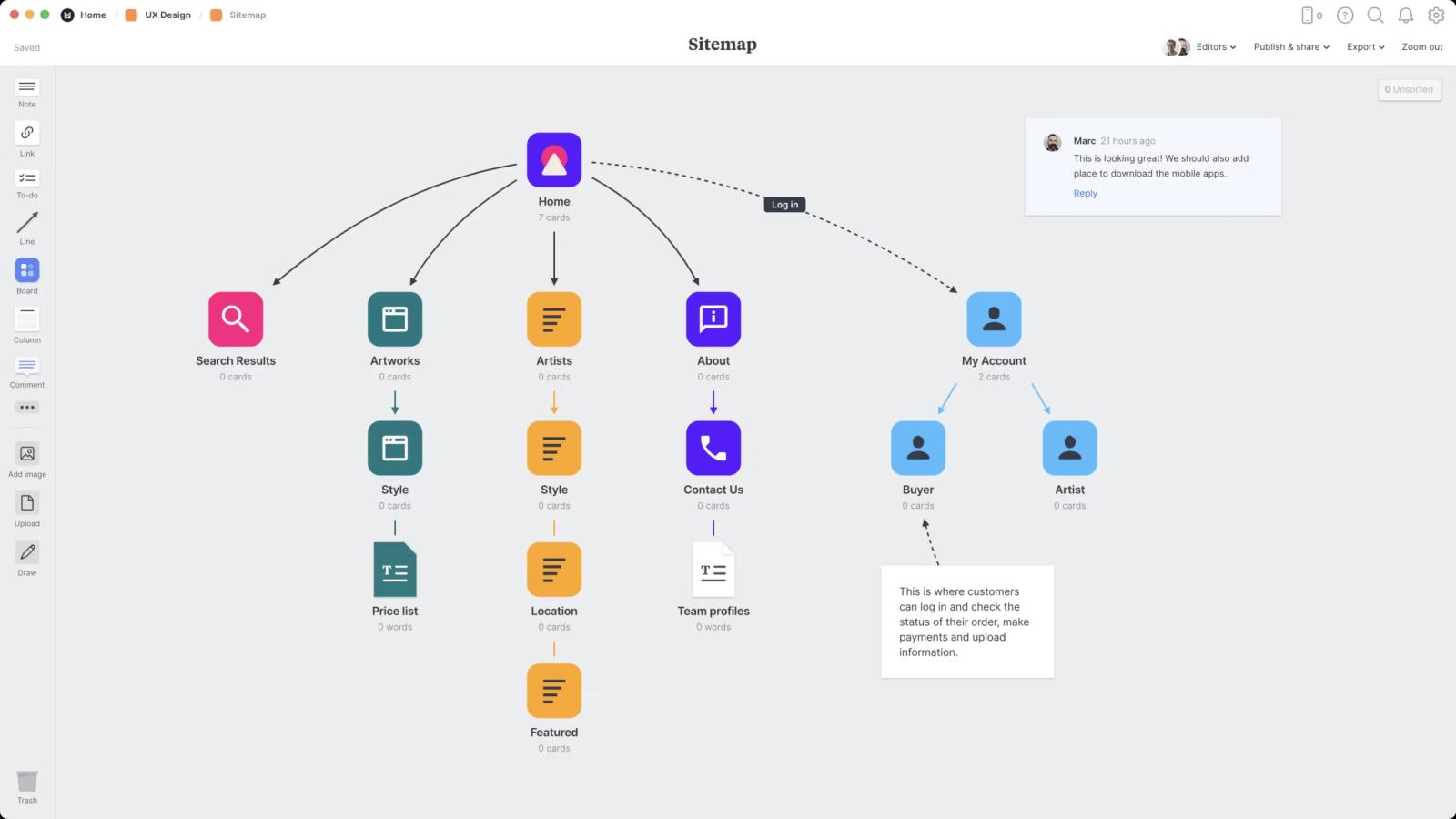
A sitemap is a file that lists all the pages, images, videos, or other content on your website, helping search engines like Google understand its structure. By providing a clear roadmap, sitemaps ensure that search engines can crawl and index your content efficiently, which is vital for improving search rankings.
Types of Sitemaps
- XML Sitemap: A machine-readable file for search engines, listing URLs with metadata like last modified dates and priority.
- HTML Sitemap: A user-friendly page for visitors, often linked in the footer, aiding navigation.
- Image Sitemap: Focuses on image URLs to improve visibility in image search results.
- Video Sitemap: Highlights video content for better indexing in video search results.
Why Sitemaps Matter for SEO
Sitemaps directly impact SEO by:
- Improving Crawlability: Search engines discover new or updated pages faster.
- Enhancing Indexability: Clear structure ensures all important pages are indexed.
- Boosting Rankings: Well-optimized sitemaps signal relevance and authority.
- Supporting Large Websites: Helps search engines navigate complex or large sites with deep page hierarchies.
For businesses, a properly implemented sitemap can lead to higher visibility and traffic, driving conversions. Curious about optimizing your site? Explore my SEO services to get started.
How to Create an XML Sitemap for SEO
Creating an XML sitemap is straightforward with the right tools and steps. Below is a step-by-step guide to ensure your sitemap is SEO-friendly.
Step 1: Identify Pages to Include
- Include all important pages: homepage, service pages, blog posts, product pages.
- Exclude low-value pages: login pages, duplicate content, or thin pages.
- Prioritize pages with high-quality content or conversion potential.
Step 2: Use a Sitemap Generator
Sitemap generators automate the process, saving time and ensuring accuracy. Popular tools include:
| Tool | Features | Pricing | Best For |
| Screaming Frog | Crawls up to 500 URLs for free, exports XML sitemaps | Free tier; Paid from $259/year | Small to medium websites |
| Yoast SEO | Auto-generates sitemaps for WordPress sites | Free; Premium at $99/year | WordPress users |
| XML-Sitemaps.com | Simple online generator, supports up to 500 pages | Free; Paid for larger sites | Quick, small-scale projects |
Source: Screaming Frog, Yoast
Step 3: Structure Your XML Sitemap
An XML sitemap follows a specific format. Here’s a basic example:
<?xml version="1.0" encoding="UTF-8"?>
<urlset xmlns="http://www.sitemaps.org/schemas/sitemap/0.9">
<url>
<loc>https://sadekurrahman.com/</loc>
<lastmod>2025-07-26</lastmod>
<changefreq>weekly</changefreq>
<priority>1.0</priority>
</url>
<url>
<loc>https://sadekurrahman.com/services/</loc>
<lastmod>2025-07-20</lastmod>
<changefreq>monthly</changefreq>
<priority>0.8</priority>
</url>
</urlset>
- loc: The URL of the page.
- lastmod: Last modification date (YYYY-MM-DD).
- changefreq: How often the page changes (daily, weekly, monthly).
- priority: Importance of the page (0.0 to 1.0, with 1.0 being highest).
Step 4: Submit to Search Engines
- Google Search Console: Upload your sitemap under the “Sitemaps” section.
- Bing Webmaster Tools: Submit via the “Sitemaps” tool.
- Regularly monitor crawl errors to ensure proper indexing.
Step 5: Test Your Sitemap
Use tools like Google’s Rich Results Test to validate your sitemap. Ensure it’s free of errors and accessible to crawlers.
Need help setting up your sitemap? Book a meeting with me to optimize your site for SEO success.
Optimizing Your Sitemap for Maximum SEO Impact
A sitemap alone isn’t enough—it must be optimized to align with SEO best practices.
Include Only Canonical URLs
- Avoid duplicate URLs (e.g., HTTP vs. HTTPS or trailing slashes).
- Use canonical tags to signal preferred URLs to search engines.
Update Regularly
- Reflect new pages or content updates in your sitemap.
- Set appropriate lastmod dates to signal freshness.
Prioritize High-Value Pages
- Assign higher priority (0.8–1.0) to pages like your homepage or key service pages (e.g., Plans & Pricing).
- Lower priority (0.1–0.4) for less critical pages like terms of service.
Optimize for Mobile and Speed
- Ensure all listed URLs are mobile-friendly.
- Compress images and videos to reduce load times, improving user experience and SEO.
Use Sitemap Index Files for Large Sites
For websites with thousands of pages, use a sitemap index file to organize multiple sitemaps:
<?xml version="1.0" encoding="UTF-8"?>
<sitemapindex xmlns="http://www.sitemaps.org/schemas/sitemap/0.9">
<sitemap>
<loc>https://sadekurrahman.com/sitemap-pages.xml</loc>
<lastmod>2025-07-26</lastmod>
</sitemap>
<sitemap>
<loc>https://sadekurrahman.com/sitemap-posts.xml</loc>
<lastmod>2025-07-20</lastmod>
</sitemap>
</sitemapindex>
This approach improves crawl efficiency for large websites.
How Sitemaps Improve Search Rankings
Sitemaps contribute to better rankings by addressing key SEO factors:
- Discoverability: Search engines find new or deep pages that might otherwise be missed.
- Crawl Budget Optimization: Directs crawlers to prioritize important pages, especially for large sites.
- Rich Snippet Opportunities: Image and video sitemaps enhance visibility in specialized search results.
- Site Authority: A well-structured sitemap signals a professional, organized website.
For real-world results, check out my case studies to see how I’ve helped businesses boost rankings with technical SEO.
Common Sitemap Mistakes to Avoid
Avoid these pitfalls to ensure your sitemap supports your SEO goals:
- Including Non-Indexable Pages: Exclude pages with noindex tags or redirects.
- Broken URLs: Test all URLs for 404 errors before submission.
- Overloading Sitemaps: Keep sitemaps under 50,000 URLs or 50MB (uncompressed).
- Ignoring Updates: Failing to update sitemaps after adding new content.
Why Choose Sadekur Rahman for Your SEO Needs?
As an SEO specialist, I bring proven expertise to help businesses like yours succeed online. Here’s why you should partner with me:
- Tailored Strategies: Customized SEO plans to fit your business goals.
- Proven Results: See how I’ve driven growth in my case studies.
- Hands-On Support: From sitemap creation to full SEO audits, I’m here to help.
Ready to elevate your search rankings? Contact me or explore my services to get started.
FAQ: Sitemaps and SEO
What is an XML sitemap?
An XML sitemap is a file that lists a website’s URLs, helping search engines crawl and index content efficiently.
Do I need a sitemap for SEO?
Yes, a sitemap improves crawlability and indexability, especially for large or complex websites, boosting SEO performance.
How often should I update my sitemap?
Update your sitemap whenever you add new pages or make significant content changes, typically monthly for most sites.
Can I create a sitemap manually?
Yes, but using a sitemap generator like Yoast SEO or Screaming Frog is faster and reduces errors.
Take the Next Step for SEO Success
A well-crafted sitemap is a foundational step toward SEO success. By ensuring search engines can easily crawl and index your site, you’ll boost visibility and drive more traffic to key pages like Plans & Pricing or Services.
Let’s work together to optimize your website and achieve your business goals. Book a meeting today or contact me for a personalized SEO strategy!

Written by Sadekur Rahman
SEO & Website Strategy Specialist at Pixelvega and SEO Executive at Daily Amar Desh. 6+ years helping brands grow with data-driven SEO.