Why Are My E-Commerce Pages Getting Deindexed? Fix It Fast
E-commerce pages disappearing from Google? Learn why products get deindexed and proven strategies to recover indexation and rankings fast.

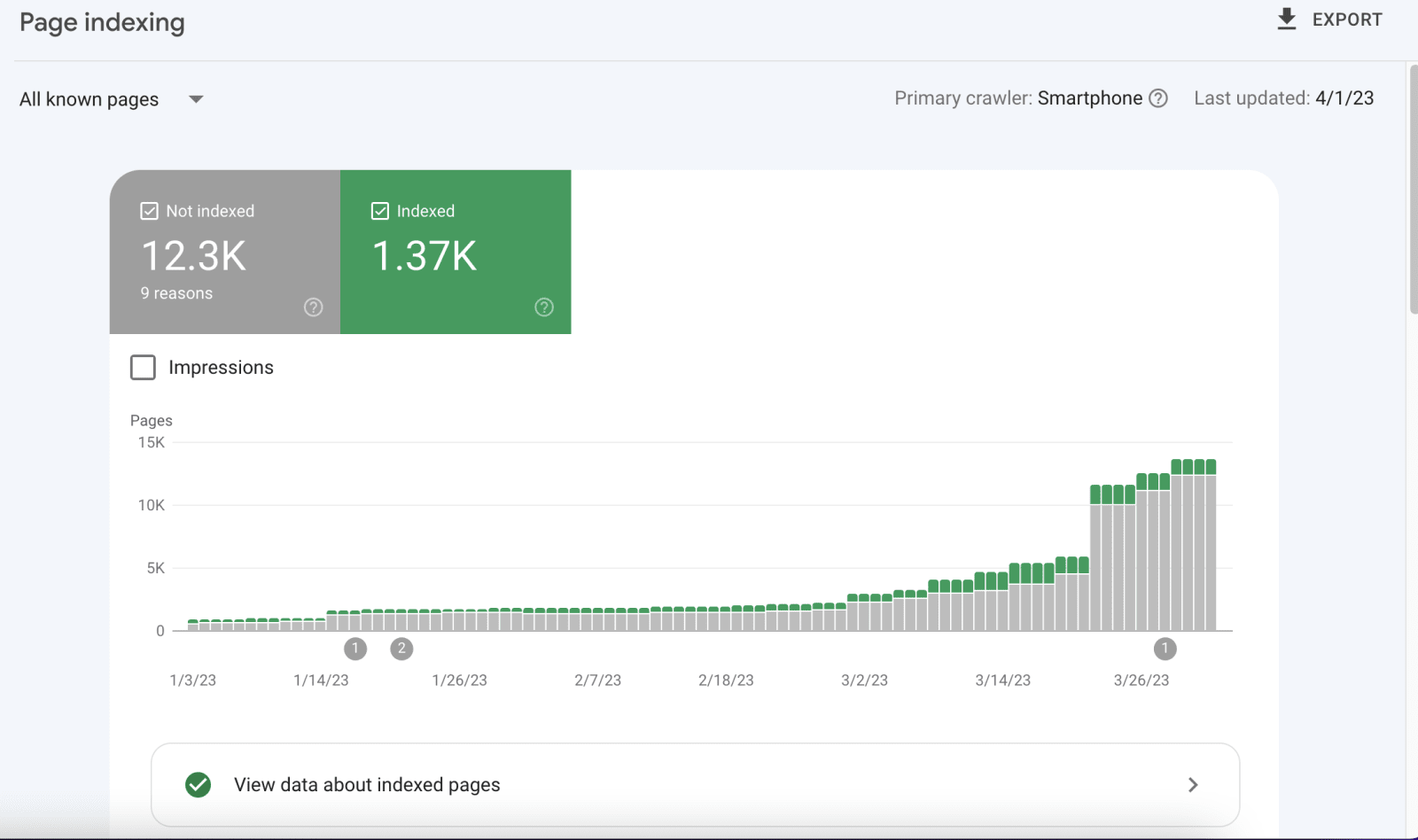
You're monitoring your e-commerce site's performance when you notice something alarming: product pages that were indexed yesterday have disappeared from Google. A site:yourdomain.com search shows fewer pages than you have products. Your best-selling items can't be found in search results. Traffic is dropping daily.
Product deindexation is one of the most frightening issues e-commerce businesses face. Unlike ranking drops where you're still visible just lower, deindexation means complete invisibility. Your products don't exist in Google's eyes. Potential customers searching for exactly what you sell can't find you.
The causes range from technical errors to quality issues to inadvertent configuration mistakes. Some deindexation happens suddenly after updates or changes. Other times pages gradually disappear as Google reassesses your site. Understanding why pages get deindexed is essential to fixing the problem and preventing recurrence.
This comprehensive guide reveals exactly why e-commerce pages get deindexed, how to diagnose your specific issue, and step-by-step recovery strategies to restore your product visibility in Google.
Understanding E-Commerce Deindexation
Before panicking, understand what deindexation actually means and how to confirm it:
What Is Deindexation?
Deindexation occurs when Google removes pages from its search index. These pages:
- Don't appear in search results for any query
- Don't show when searching "site:yourdomain.com"
- Can't be found even when searching the exact product name
- Have been removed from Google's database of crawled pages
Deindexation vs. ranking drops:
It's critical to distinguish deindexation from low rankings:
Deindexation:
- Page completely absent from Google's index
- Site:yourdomain.com search doesn't show the page
- Google Search Console shows as "Excluded" or "Not indexed"
- Zero impressions for any keywords in Search Console
Low rankings:
- Page still indexed but ranking poorly (page 5, 10, etc.)
- Appears in site:yourdomain.com search
- Google Search Console shows as "Indexed"
- Some impressions still occurring, just few clicks
Many businesses confuse low rankings with deindexation, leading to incorrect solutions.
How to Confirm Deindexation
Method 1: Site search operator:
site:yourdomain.com exact-product-name
If your product doesn't appear, it's likely deindexed.
Method 2: URL Inspection Tool in Search Console:
- Open Google Search Console
- Enter the specific product URL
- Check "Coverage" status
- Look for:
- "URL is not on Google" = deindexed
- "URL is on Google" = indexed
- "Crawled - currently not indexed" = discovered but not indexed
Method 3: Google Search Console Coverage Report:
Navigate to Coverage report to see:
- Total indexed pages vs. total pages
- "Excluded" pages and reasons
- "Error" pages preventing indexation
- Recent changes in index status
Method 4: Index status tracking:
Compare current indexed pages to historical baseline:
site:yourdomain.com/products
Track this count weekly to identify sudden drops.
Learn more about comprehensive SEO audits to identify indexation issues.
Common Causes of E-Commerce Deindexation
Product pages get deindexed for numerous reasons. Identify your specific cause:
Technical Issues Causing Deindexation
Robots.txt blocking:
The most common cause accidentally blocking product pages in robots.txt.
Check your robots.txt file:
yourdomain.com/robots.txt
Common mistakes:
# BAD - Blocks all product pages
Disallow: /products/
# BAD - Blocks all pages (catastrophic error)
Disallow: /
# BAD - Blocks important parameters
Disallow: /*?*
Even experienced developers accidentally block important pages during updates or testing.
Noindex meta tags:
Pages with <meta name="robots" content="noindex"> get deindexed.
Common causes:
- Staging site settings carried over to production
- Plugins or apps adding noindex automatically
- Template changes introducing noindex
- Out-of-stock product handling gone wrong
- Developer testing not reversed
Check for noindex: View page source and search for:
<meta name="robots" content="noindex">
X-Robots-Tag HTTP headers:
Server-level directives can noindex pages without visible meta tags.
Check HTTP headers:
curl -I https://yourdomain.com/product-page
Look for:
X-Robots-Tag: noindex
This often happens with:
- Server configuration changes
- CDN settings
- Security plugin configurations
- Hosting provider defaults
Canonical tag issues:
Improper canonical implementation causes deindexation.
Problems:
<!-- Self-referencing canonical pointing to different page -->
<link rel="canonical" href="https://yourdomain.com/different-page">
<!-- Canonical chain (A→B→C) -->
<link rel="canonical" href="page-b">
<!-- page-b canonicals to page-c -->
<!-- Canonical to non-existent page -->
<link rel="canonical" href="https://yourdomain.com/404-page">
Google may deindex pages with confusing canonical signals.
JavaScript rendering issues:
Google struggles with JavaScript-heavy sites. If critical content loads via JavaScript:
- Google might not see product information
- Pages appear thin or empty to crawlers
- Indexation fails or pages get deindexed
Test JavaScript rendering: Use Google's URL Inspection Tool and compare:
- Live URL test (how Google sees it)
- View Crawled Page screenshot
- Rendered HTML
If content missing in Google's view, you have a rendering problem.
Server errors and accessibility:
Pages returning 500 errors, timing out, or being inaccessible get deindexed.
Common issues:
- Overloaded servers during traffic spikes
- Database connection failures
- Hosting resource limits
- Slow page loads (30+ seconds)
- Intermittent availability
Check Google Search Console for:
- Server error reports
- Crawl errors
- Timeout issues
Our technical SEO checklist covers these issues comprehensively.
Quality Issues Triggering Deindexation
Thin or duplicate content:
Google deindexes pages it considers low-quality or duplicate.
E-commerce thin content red flags:
- Very short product descriptions (under 100 words)
- Identical descriptions across color/size variants
- Manufacturer descriptions copied without changes
- No unique content beyond product specifications
- Minimal differentiation between similar products
Google's perspective: If 20 products have near-identical descriptions with only the product name changed, Google may view these as duplicate thin content not worth indexing.
Solution approach:
- Write unique, substantive descriptions (300+ words)
- Add unique value (styling tips, use cases, comparisons)
- Include customer reviews and Q&A
- Add images and videos
- Create comparison tables
Out-of-stock product handling:
Improper out-of-stock management causes deindexation.
Common mistakes:
- Automatically noindexing products when stock depletes
- Deleting product pages when inventory runs out
- Redirecting out-of-stock products to categories
- Leaving pages with no content when unavailable
Better approach:
- Keep pages indexed with clear availability messaging
- Implement waitlist signup
- Recommend alternatives
- Only deindex permanently discontinued products
Review our guide on out-of-stock product SEO for proper handling.
Doorway or low-value pages:
Google deindexes pages it classifies as doorway pages or spam.
E-commerce examples:
- Overly aggressive filtering creating thousands of thin pages
- Parameter-based pages with minimal content differences
- City-specific product pages with identical content
- Excessive pagination creating thin pages
- Auto-generated pages lacking value
Spam or manipulative content:
Pages violating Google's spam policies get deindexed:
- Keyword stuffing in descriptions
- Hidden text or links
- Cloaking different content to users vs. search engines
- Affiliate-heavy pages with minimal unique value
- Scraped or plagiarized content
Crawl Budget and Priority Issues
Large site crawl budget exhaustion:
Google allocates limited crawl budget. On very large e-commerce sites (10,000+ products):
- Important pages may not get crawled regularly
- New products take long to get discovered
- Deindexation occurs when pages not recrawled within timeframe
Poor site architecture:
Deep product pages (6+ clicks from homepage) may not get:
- Crawled frequently enough
- Sufficient internal link equity
- Prioritized for indexation
Low-quality incoming links:
Pages with no internal links or weak link profiles may get deprioritized.
Manual Actions and Penalties
Manual spam actions:
Google's human reviewers can manually deindex pages or entire sites.
Check for manual actions:
- Open Google Search Console
- Navigate to Security & Manual Actions → Manual Actions
- Look for any active actions
Common causes for e-commerce:
- Unnatural backlinks (paid links, link schemes)
- Thin content with little value-add
- Pure affiliate pages
- Hacked content or spam injection
- Cloaking or sneaky redirects
Algorithmic penalties:
While not manual, algorithm updates can effectively deindex pages:
- Panda (low-quality content)
- Penguin (link spam)
- Product Reviews Update (thin reviews)
- Helpful Content Update (unhelpful pages)
Diagnosing Your Specific Deindexation Issue
Systematic diagnosis identifies the exact cause:
Step 1: Check Google Search Console
Coverage Report analysis:
Navigate to Coverage and examine:
Excluded pages:
- Excluded by noindex tag
- Blocked by robots.txt
- Duplicate without user-selected canonical
- Crawled - currently not indexed
- Discovered - currently not indexed
Error pages:
- Server error (5xx)
- Redirect error
- Not found (404)
- Soft 404
Valid but warnings:
- Indexed, though blocked by robots.txt (problematic)
Document findings:
- How many pages affected
- Which exclusion reasons dominate
- When deindexation started (time graph)
- Which sections of site (products, categories, etc.)
URL Inspection detailed checks:
Test affected product URLs individually:
- Enter URL in inspection tool
- Review:
- Coverage status
- Last crawl date
- Crawl allowed status
- Indexing allowed status
- User-declared canonical
- Google-selected canonical
- Click "View Crawled Page"
- Review rendered HTML
Compare problem pages to correctly indexed ones to identify differences.
Step 2: Technical Crawl Audit
Use Screaming Frog or similar tool:
Crawl your site to identify:
Indexation directives:
- Pages with noindex meta tags
- Pages with X-Robots-Tag headers
- Canonical URL patterns
- Robots.txt blocking
Status codes:
- 404 errors on product pages
- 500 server errors
- Redirect chains
- Slow response times
Content analysis:
- Very thin pages (low word count)
- Duplicate content patterns
- Missing titles or descriptions
- Missing or broken schema markup
Link analysis:
- Orphaned pages (no internal links)
- Weak internal link structure
- Excessive outbound links
- Link equity distribution
Step 3: Content Quality Assessment
Review deindexed pages:
Examine content on affected pages:
Quantitative checks:
- Word count (aim for 300+ on products)
- Unique content percentage
- Image quantity and quality
- Schema markup presence
Qualitative assessment:
- Genuine value beyond specifications
- Differentiation from similar products
- User-generated content (reviews, Q&A)
- Helpful supplementary information
Compare to indexed competitors: Analyze competitor pages that rank for similar products:
- What content do they include?
- How detailed are descriptions?
- What unique elements do they add?
- How do they structure information?
Step 4: Check Recent Changes
Correlate deindexation with events:
Platform or theme updates:
- Did you update e-commerce platform recently?
- New theme or template installation?
- Plugin or app installations?
- Major design changes?
Configuration changes:
- robots.txt modifications
- URL structure changes
- Canonical tag implementation
- Server moves or CDN changes
Content changes:
- Bulk content updates
- Template modifications
- Product import/export
- Category restructuring
Review git commits, change logs, or backup dates to identify what changed before deindexation started.
Step-by-Step Recovery Process
Once you've identified the cause, implement fixes systematically:
Fix Technical Blocking Issues
Robots.txt corrections:
If robots.txt blocks important pages:
- Edit robots.txt file
- Remove blocking directives
- Upload corrected version
- Request recrawl in Search Console
Before:
User-agent: *
Disallow: /products/
After:
User-agent: *
Disallow: /admin/
Disallow: /checkout/
# Products now crawlable
Validate changes: Use Google Search Console's robots.txt tester before deploying.
Remove noindex tags:
Identify all sources of noindex:
Meta tag noindex: Search codebase for:
<meta name="robots" content="noindex">
Remove from product pages unless legitimately low-value (true duplicates, test pages, etc.).
HTTP header noindex: Check server configuration, .htaccess, nginx config, CDN settings for:
X-Robots-Tag: noindex
Remove inappropriate noindex headers.
Plugin/app introduced noindex:
- Review SEO plugin settings
- Check e-commerce platform app configurations
- Disable apps temporarily to test
- Review staging-to-production deployment processes
Fix canonical issues:
Self-referencing canonicals: Ensure product pages canonical to themselves:
<!-- On https://example.com/product-page -->
<link rel="canonical" href="https://example.com/product-page">
Remove canonical chains: Never point canonicals to pages that themselves canonical elsewhere.
Validate canonical targets exist: Ensure canonical URLs return 200 status codes, not 404s or redirects.
Address JavaScript rendering:
If content not visible to Google:
Implement server-side rendering (SSR):
- Next.js for React
- Nuxt.js for Vue
- Universal rendering solutions
Use dynamic rendering: Serve pre-rendered HTML to search bots while maintaining JavaScript for users.
Pre-render critical content: Ensure product information, prices, availability load server-side, not only via JavaScript.
Test in Search Console: Use URL Inspection tool's "Test Live URL" feature to verify Google sees content.
Resolve server issues:
Improve server capacity:
- Upgrade hosting if overwhelmed
- Implement caching (Redis, Varnish)
- Optimize database queries
- Use CDN for static assets
Monitor uptime:
- Set up monitoring (UptimeRobot, Pingdom)
- Alert for downtime immediately
- Ensure consistent accessibility
Optimize page speed:
- Reduce server response time below 600ms
- Optimize images
- Minimize JavaScript/CSS
- Enable compression
Review our website audit checklist for comprehensive technical fixes.
Improve Content Quality
Enhance thin product descriptions:
Minimum standards:
- 300+ words of unique content per product
- Unique value beyond manufacturer descriptions
- Answer common customer questions
- Include styling/usage suggestions
- Add comparison information
Content template:
[Unique Opening Paragraph - 50-100 words describing product value]
Key Features:
- [Feature with benefit explanation]
- [Feature with benefit explanation]
- [etc.]
[Detailed Description - 100-150 words]
- What it's made of and why that matters
- How to use or wear it
- Who it's perfect for
- Unique selling points
Specifications:
[Technical specs table]
Why Choose This Product:
- [Reason 1]
- [Reason 2]
- [Reason 3]
Care Instructions / Usage Tips:
[Practical information]
Customer Reviews:
[Display reviews]
Q&A:
[Common questions answered]
Differentiate variant pages:
For products with color/size variants:
- Write unique descriptions highlighting variant differences
- Use different images
- Include variant-specific information
- Consider canonicalizing less important variants to main
Add supplementary content:
User-generated content:
- Enable and encourage reviews
- Implement Q&A sections
- Showcase customer photos
- Include video testimonials
Rich media:
- Multiple high-quality product images
- 360-degree views
- Product videos
- Size/fit guides
- Comparison charts
Structured data: Implement Product schema completely:
{
"@context": "https://schema.org/",
"@type": "Product",
"name": "Product Name",
"image": ["image1.jpg", "image2.jpg"],
"description": "Unique product description",
"sku": "SKU123",
"brand": {
"@type": "Brand",
"name": "Brand Name"
},
"offers": {
"@type": "Offer",
"url": "https://example.com/product",
"priceCurrency": "USD",
"price": "99.99",
"availability": "https://schema.org/InStock"
},
"aggregateRating": {
"@type": "AggregateRating",
"ratingValue": "4.5",
"reviewCount": "89"
}
}
Learn about product page optimization strategies.
Optimize Site Architecture
Improve internal linking:
Flat architecture: Ensure products reachable within 3-4 clicks from homepage:
- Homepage → Category → Subcategory → Product
Strong internal links:
- Link from category pages to products
- Related products on each product page
- Recently viewed items
- Frequently bought together
- Blog posts linking to products
Breadcrumbs: Implement breadcrumbs on all product pages:
<nav aria-label="Breadcrumb">
<ol>
<li><a href="/">Home</a></li>
<li><a href="/category">Category</a></li>
<li><a href="/subcategory">Subcategory</a></li>
<li>Product Name</li>
</ol>
</nav>
XML sitemap optimization:
Include product pages:
<?xml version="1.0" encoding="UTF-8"?>
<urlset xmlns="http://www.sitemaps.org/schemas/sitemap/0.9">
<url>
<loc>https://example.com/product-page</loc>
<lastmod>2026-02-02</lastmod>
<changefreq>daily</changefreq>
<priority>0.8</priority>
</url>
</urlset>
Submit updated sitemap:
- Generate complete sitemap including all products
- Upload to server
- Submit via Google Search Console
- Monitor processing in Sitemaps report
Reduce crawl waste:
Block low-value pages:
- Filter pages (unless valuable)
- Search result pages
- Shopping cart and checkout
- User account pages
- Sort/display preference pages
Optimize crawl budget:
- Use Crawl-delay if needed
- Monitor crawl stats in Search Console
- Fix redirect chains
- Eliminate duplicate content
Check our crawl budget optimization guide.
Request Reindexation
After fixing issues, actively request indexation:
URL Inspection Tool:
For individual pages:
- Enter URL in Search Console URL Inspection
- Click "Request Indexing"
- Wait for confirmation
- Repeat for priority pages
Limit: ~10-15 URLs per day via this method.
Sitemap resubmission:
For bulk reindexation:
- Ensure sitemap includes all fixed pages
- Resubmit sitemap in Search Console
- Monitor "Sitemaps" report for processing
- Watch Coverage report for index increases
Improve crawl frequency naturally:
- Update product pages with fresh content
- Add new products regularly
- Publish blog content linking to products
- Build backlinks to important products
- Increase site authority overall
Indexing timeline expectations:
- Individual requests: 1-7 days typically
- Sitemap processing: 1-4 weeks
- Full index recovery: 2-8 weeks depending on issue severity
- Large sites: May take 2-3 months for complete recovery
Preventing Future Deindexation
Proactive measures prevent recurrence:
Regular Monitoring
Weekly index checks:
# Monday morning routine
site:yourdomain.com/products
Track count and investigate sudden drops.
Monthly Search Console reviews:
- Coverage report trends
- New excluded pages
- Error increases
- Crawl stat changes
Automated alerts:
Set up monitoring:
- Google Search Console email alerts
- Third-party index tracking
- Uptime monitoring
- Rank tracking for key products
Development Best Practices
Staging environment testing:
Before production deployment:
- Verify no noindex tags
- Check robots.txt doesn't block
- Test canonical implementation
- Validate schema markup
- Review internal linking
Deployment checklist:
□ Remove all noindex tags from production code □ Verify robots.txt allows product crawling □ Test canonical URLs point correctly □ Confirm XML sitemap includes all products □ Validate schema markup □ Check page accessibility (200 status codes) □ Test JavaScript rendering □ Review internal link structure
Version control and rollback:
- Maintain git history of changes
- Keep backups before major updates
- Document configuration changes
- Test rollback procedures
- Have recovery plan ready
Content Standards
Product description minimum requirements:
Set and enforce standards:
- Minimum 300 words unique content
- All required fields completed
- Unique value-add beyond specs
- Quality images (minimum quantity/resolution)
- Schema markup implemented
- Review collection enabled
Quality control process:
Before launching new products:
- Content review checklist
- Comparison to successful products
- SEO element verification
- Link structure confirmation
- Mobile experience testing
Regular content audits:
Quarterly review:
- Identify thin content pages
- Find duplicate descriptions
- Update outdated information
- Refresh successful product content
- Improve underperforming pages
Learn about e-commerce SEO best practices for ongoing optimization.
Frequently Asked Questions About Product Deindexation
How long does it take for Google to reindex pages after fixing issues?
Reindexation timeline varies by issue severity and site authority. After requesting indexation through Search Console, individual pages typically reindex within 1-7 days. Full index recovery for many pages can take 2-8 weeks. Large sites with thousands of affected pages may need 2-3 months for complete recovery. Speed up the process by fixing all issues completely, requesting indexation through URL Inspection Tool, submitting updated sitemaps, building internal links to affected pages, and publishing fresh content linking to products.
Can I reindex products by just updating the publication date?
No, simply changing dates without meaningful updates rarely triggers reindexation and definitely won't fix underlying issues. Google needs genuine signals that pages have improved. Instead, make substantive content improvements, fix technical issues causing deindexation, add new sections or information, implement or improve schema markup, and then request indexation through Search Console. Fake freshness signals without real improvements can be seen as manipulation.
Will deindexed pages hurt my overall site rankings?
Deindexation itself doesn't directly penalize other pages, but it indicates problems that can hurt overall site perception. If many pages are deindexed for quality issues, it suggests site-wide quality problems that may affect rankings broadly. If deindexation is due to technical errors only, fixing them shouldn't hurt other pages. However, site-wide quality issues (thin content, duplicate content, spam) definitely impact overall site authority and rankings even for pages that remain indexed.
Should I delete deindexed product pages and start over?
Generally no, unless pages violated Google's guidelines so severely they'll never recover. For most deindexation issues, fixing existing pages is better than deleting because you preserve accumulated authority, maintain existing backlinks, keep historical ranking data, avoid creating 404 errors, and can build on existing foundation. Only delete if the product is permanently discontinued, content quality is irredeemably poor, pages were genuinely spam, or starting over is easier than fixing. Even then, use proper 301 redirects to preserve any value.
Why Choose Sadekur Rahman for E-Commerce Indexation Issues
Diagnosing and fixing deindexation requires specialized e-commerce SEO expertise and systematic troubleshooting.
Our E-Commerce Indexation Expertise
As an experienced SEO specialist, I provide comprehensive deindexation diagnosis and recovery:
- Complete technical audit identifying indexation issues
- Root cause analysis for deindexation
- Step-by-step recovery implementation
- Content quality improvement strategies
- Site architecture optimization
- Ongoing monitoring and prevention
- Platform-specific expertise
- Fast recovery protocols
Proven Recovery Success
Our case studies demonstrate successful recoveries:
- Restored 10,000+ deindexed product pages
- Recovered from technical blocking issues
- Fixed mass deindexation after platform migrations
- Improved thin content across large catalogs
- Resolved JavaScript rendering problems
- Recovered from manual actions
- Prevented future indexation issues
Comprehensive E-Commerce Solutions
Our complete e-commerce SEO services prevent and solve indexation issues:
- Technical SEO and site architecture
- Product page optimization
- Content quality enhancement
- Schema markup implementation
- Crawl budget optimization
- Platform migration support
- Ongoing monitoring and maintenance
Emergency Recovery Services
For critical deindexation situations:
Rapid diagnosis:
- 24-48 hour initial assessment
- Identification of primary causes
- Priority fix recommendations
- Emergency recovery protocols
Implementation support:
- Hands-on technical fixes
- Content improvement coordination
- Reindexation request management
- Daily monitoring during recovery
Explore our plans and pricing including emergency services.
Restore Your Product Visibility
Don't let deindexed products continue losing revenue. Book a meeting for emergency indexation diagnosis and recovery planning.
Need immediate help? Contact us for rapid response to critical deindexation issues.
Conclusion
E-commerce page deindexation is alarming but usually fixable. Whether caused by technical blocking, content quality issues, site architecture problems, or configuration mistakes, systematic diagnosis and recovery can restore your product visibility.
The key is acting quickly once deindexation is discovered. Every day products remain deindexed represents lost revenue and weakening site authority. Start with confirming actual deindexation vs. low rankings, use Google Search Console to identify specific issues, audit technical blocking (robots.txt, noindex, canonicals), assess content quality and uniqueness, and review recent changes that might have triggered deindexation.
Fix issues comprehensively partial fixes often fail. Remove technical blocking completely, enhance content quality site-wide, optimize site architecture and internal linking, implement proper schema markup, and request reindexation through all available channels.
Prevention is easier than recovery. Implement monitoring to catch issues early, maintain strict development deployment standards, enforce minimum content quality requirements, regular technical audits, and clear rollback procedures for problems.
Your product pages are your revenue source. Deindexation directly impacts your bottom line. Whether you troubleshoot internally or seek expert help, resolving indexation issues must be the highest priority. The businesses that recover fastest are those that act decisively with comprehensive fixes rather than piecemeal attempts.
Don't wait for Google to eventually recrawl and maybe reindex your pages. Take control of the recovery process today and restore your e-commerce visibility.
Related Articles:

Written by Sadekur Rahman
SEO & Website Strategy Specialist at Pixelvega and SEO Executive at Daily Amar Desh. 6+ years helping brands grow with data-driven SEO.