How to Fix "Not Showing in Maps" Local SEO Problem (Complete Guide)
Fix your Google Maps visibility issues with this complete guide. Learn why your business isn't showing and get actionable solutions to rank in the local map pack.

Your business exists. You have a Google Business Profile. But when potential customers search for your services in your area, you're nowhere to be found on Google Maps. This "invisible business" problem costs you customers every single day—and it's more common than you think.
If your business isn't showing in Google Maps or the local map pack (the top 3 local results), you're missing out on the most valuable real estate in local search. Studies show that 76% of people who search for something nearby visit a business within a day, and 28% of those searches result in purchases. When you're invisible, those customers go to your competitors instead.
This comprehensive guide reveals exactly why businesses don't show in Google Maps and provides step-by-step solutions to fix the problem and start capturing local search traffic.
Understanding Google Maps and Local Search
Before solving the problem, let's clarify how Google Maps visibility works and why it matters for your business.
What Is the Google Maps Pack?
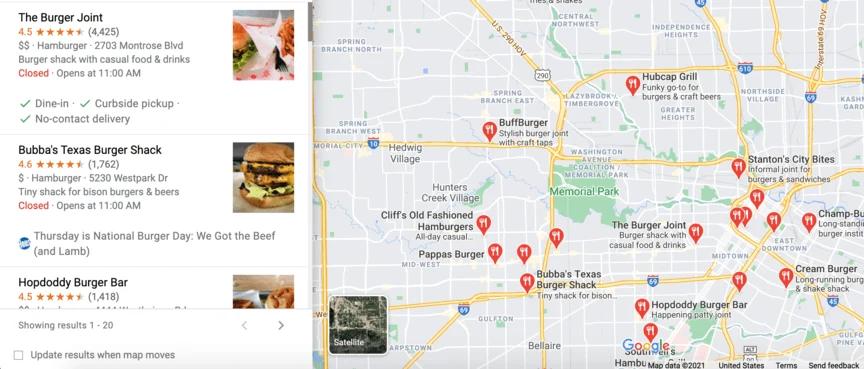
The local map pack (or "3-pack") is the box showing three local businesses with map pins that appears at the top of Google search results for location-based queries. For example, searching "plumber near me" or "coffee shop in Manhattan" triggers the map pack.
This prime real estate appears above organic search results, making it incredibly valuable. Businesses in the map pack receive significantly more clicks than those relegated to organic results below.
How Google Decides What Shows in Maps
Google uses three primary factors to determine map pack rankings:
Relevance: How well your business matches what the searcher is looking for
Distance: How far your business is from the searcher's location or the location in their query
Prominence: How well-known and trustworthy your business is (based on reviews, citations, links, and other signals)
Understanding these factors helps you diagnose why you're not appearing and what to fix.
The 12 Most Common Reasons You're Not Showing in Maps
Let's diagnose the specific issue preventing your Google Maps visibility.
1. Your Google Business Profile Isn't Verified
The most common reason businesses don't appear in Maps is simple: they haven't verified their Google Business Profile (formerly Google My Business).
How to check:
- Go to Google Business Profile
- Sign in with your Google account
- Search for your business
- Check verification status
If unverified: Google will prompt you to verify through postcard, phone, email, or instant verification (depending on your business type).
Verification timeline: Postcard verification takes 5-14 days. Once verified, your business should appear in Maps within 24-48 hours.
2. Your Business Address Is Hidden or Incorrect
Service area businesses (plumbers, electricians, home services) that serve customers at their locations rather than at a business address face unique challenges.
Common address problems:
- Address is marked as "I serve customers at their location" but you also need a service area defined
- Physical address doesn't match your actual location
- Address is incomplete (missing suite/unit number)
- Address uses P.O. Box (not allowed for most business types)
- Multiple businesses share the same address without proper suite numbers
How to fix:
- Go to your Google Business Profile
- Click "Info" → "Address"
- Ensure your address is complete and accurate
- For service area businesses, hide your address but define your service areas clearly
- Save changes and wait 24 hours for processing
3. You're Searching Outside Your Service Area
If you're a service area business, you might not appear when searching from locations outside your defined service area.
Example scenario: Your plumbing business serves a 20-mile radius from your office. When you search from 30 miles away, you won't appear—and that's correct behavior.
How to test properly:
- Use incognito mode to avoid personalized results
- Simulate searches from within your actual service area
- Use the location filter in Google Maps: "Search: plumber near [specific address in your area]"
4. Your Business Category Is Wrong or Missing
Your primary business category is one of the most important ranking factors. Incorrect categorization means you won't appear for relevant searches.
Common category mistakes:
- Using a generic category when a specific one exists
- Choosing categories based on what you want to rank for rather than what you actually are
- Missing category entirely
- Using too many irrelevant additional categories
How to optimize categories:
- Go to Google Business Profile → "Info"
- Review your primary category—this is your most important
- Choose the most specific category that accurately describes your business
- Add 5-10 relevant additional categories (but only truly relevant ones)
- Research competitors to see what categories they use successfully
Explore our local SEO services to get expert category optimization.
5. Your Business Name Violates Google's Guidelines
Google penalizes or hides businesses that stuff keywords into their business name.
Violations that cause hiding:
- "Joe's Plumbing - Best Plumber in Chicago - 24/7 Emergency"
- "Smith Law Firm | Personal Injury Lawyer | Car Accidents"
- Adding location descriptors not part of your legal name
Correct approach: Use only your actual legal business name as it appears on your storefront, business license, and official documents.
How to fix:
- Edit your business name to match your legal name exactly
- Remove all keyword stuffing
- Submit for review if flagged
- Wait for Google to process the change (can take 1-2 weeks)
6. You Have Duplicate Business Listings
Multiple listings for the same business confuse Google and dilute your ranking signals.
How duplicates happen:
- Previous business owners created listings
- Different employees created separate listings
- Moving locations but creating new listing instead of updating
- Using different name variations (Smith Law vs. Smith Law Firm)
How to find and fix duplicates:
- Search Google Maps for your business name
- Search variations of your name and address
- For each duplicate found:
- Mark the incorrect one for removal
- Report through Google Business Profile
- Merge if both listings have engagement
- Consolidate all positive aspects (reviews, photos) into one primary listing
7. Your Profile Is Incomplete or Low Quality
Google favors complete, informative business profiles. Sparse profiles rank poorly or don't appear at all.
Essential profile elements:
- Complete and accurate business information
- Detailed business description (750 characters)
- Accurate hours including special hours
- High-quality photos (minimum 10, ideally 50+)
- Regular posts and updates
- Services or products listed
- Attributes selected
- Correct phone number and website
Completion checklist:
| Element | Importance | Status |
| Business name | Critical | ✓ |
| Address | Critical | ✓ |
| Phone number | Critical | ✓ |
| Category | Critical | ✓ |
| Hours | High | ✓ |
| Website | High | ✓ |
| Description | High | ✓ |
| Photos (10+) | High | ✓ |
| Services listed | Medium | ✓ |
| Attributes | Medium | ✓ |
| Regular posts | Medium | ✓ |
8. Your Business Is Suspended by Google
Google suspends businesses that violate their guidelines. Suspended businesses disappear completely from Maps.
Common suspension reasons:
- Keyword stuffing in business name
- Fake reviews or review manipulation
- Virtual offices or mail forwarding addresses
- Operating from a residential address (for some business types)
- Representing a business that doesn't exist at the address
How to check suspension status:
Look for a "Suspended" notification in your Google Business Profile dashboard or email from Google.
How to appeal suspension:
- Review Google's guidelines to identify the violation
- Fix the underlying issue
- Submit a reinstatement request through Google Business Profile
- Provide documentation proving legitimacy (business license, utility bills, photos of storefront)
- Wait for Google's review (typically 3-7 days, sometimes longer)
9. You Have NAP Inconsistencies
NAP stands for Name, Address, Phone number. Inconsistencies across the web confuse Google and hurt rankings.
Examples of inconsistencies:
- "123 Main St." vs. "123 Main Street"
- "(555) 123-4567" vs. "555-123-4567"
- "Smith & Sons" vs. "Smith and Sons"
Where NAP needs to be consistent:
- Google Business Profile
- Website footer and contact page
- Social media profiles
- Business directories (Yelp, Yellow Pages, industry directories)
- Citation sites
How to fix NAP issues:
- Audit your NAP across all platforms
- Standardize to one format
- Update all inconsistent listings
- Add structured data markup to your website
Learn more about technical optimization in our technical SEO checklist.
10. You're in a Highly Competitive Market
Sometimes you ARE showing in Maps—just not in the top 3 positions (the map pack). In competitive markets, you might rank #4-20, which means clicking "More places" to see you.
How to check full rankings:
- Search for your target keyword + location
- Click "More places" below the map pack
- Scroll through extended results to find your business
If you're ranking but not in top 3: This isn't a technical problem—it's a competitive ranking issue requiring optimization.
11. Your Website Has No Location Information
Google cross-references your Business Profile with your website. Missing or conflicting location information creates trust issues.
Essential website elements:
- Contact page with full address
- Footer with NAP information
- Location pages for each service area
- Embedded Google Map
- Local area code phone number
- Location-specific content
Schema markup for local business:
<script type="application/ld+json">
{
"@context": "https://schema.org",
"@type": "LocalBusiness",
"name": "Your Business Name",
"address": {
"@type": "PostalAddress",
"streetAddress": "123 Main Street",
"addressLocality": "City",
"addressRegion": "State",
"postalCode": "12345"
},
"telephone": "+1-555-123-4567"
}
</script>
Check our guide on using schema markup for detailed implementation.
12. You Have Few or No Reviews
Reviews are a critical ranking factor. Businesses with no reviews or significantly fewer reviews than competitors often don't appear in the map pack.
Review benchmarks by industry:
| Industry | Average Reviews for Map Pack |
| Restaurants | 100+ reviews |
| Service businesses | 25-50 reviews |
| Professional services | 15-30 reviews |
| Retail | 50-100 reviews |
How to generate legitimate reviews:
- Ask satisfied customers directly after service
- Send follow-up emails with review links
- Make the review process easy (direct link, not instructions)
- Respond to all reviews (positive and negative)
- Never buy fake reviews or offer incentives
Step-by-Step Fix Guide
Now that you understand the causes, follow this systematic approach to resolve your Maps visibility issue.
Step 1: Verify Your Business Profile Status
Action items:
- Log into Google Business Profile
- Confirm verification status
- If unverified, complete verification immediately
- Check for any notifications or warnings
- Review profile for suspension alerts
Expected timeline: If verification is the issue, expect 5-14 days for resolution.
Step 2: Audit Your Business Information
What to review:
- Business name (legal name only, no keywords)
- Complete address with suite/unit if applicable
- Local phone number (not toll-free or call tracking that redirects out of area)
- Primary category (most specific available)
- Business hours (including special hours for holidays)
- Service areas (for service area businesses)
Action: Correct any inaccuracies immediately and save changes.
Step 3: Complete Your Profile 100%
Don't skip anything. Google rewards comprehensive profiles.
Completion checklist:
Basic information:
- ✓ Add detailed business description (750 characters)
- ✓ Upload minimum 10 high-quality photos
- ✓ Add cover photo and logo
- ✓ List all products or services
- ✓ Select all relevant attributes
Advanced optimization:
- ✓ Add menu (restaurants)
- ✓ Add services with descriptions and pricing
- ✓ Upload interior and exterior photos
- ✓ Add team photos
- ✓ Create posts weekly
Expected timeline: Profile completion improvements show in 1-2 weeks.
Step 4: Build and Clean Citations
Citations are mentions of your NAP across the web. They build trust and authority.
High-priority citation sites:
- Yelp
- Apple Maps
- Bing Places
- Yellow Pages
- Better Business Bureau
- Industry-specific directories
Citation cleanup process:
- Use citation management tools or manually search for your business
- Identify all existing citations
- Update incorrect information
- Add missing citations to major platforms
- Ensure exact NAP consistency everywhere
Our local SEO services include comprehensive citation management.
Step 5: Optimize Your Website for Local Search
Your website must reinforce the information in your Business Profile.
Website optimization checklist:
On-page elements:
- ✓ NAP in footer on every page
- ✓ Dedicated contact page with full address
- ✓ Embedded Google Map on contact page
- ✓ Location-specific service pages
- ✓ City/region mentions in content naturally
Technical elements:
- ✓ LocalBusiness schema markup
- ✓ Mobile-friendly design
- ✓ Fast loading speed
- ✓ SSL certificate (HTTPS)
- ✓ XML sitemap submitted to Google
Learn more about website optimization in our SEO service guide.
Step 6: Generate Reviews Systematically
Reviews impact both rankings and conversion rates. Build a review generation system.
Review generation strategy:
Week 1-2:
- Ask your 10 best customers for reviews
- Send personalized requests (not mass email)
- Provide direct review link
- Follow up once if needed
Ongoing:
- Request review after every completed job/transaction
- Create email automation for review requests
- Add review request to receipts or invoices
- Train staff to ask for reviews
Important: Never buy reviews, offer incentives, or write fake reviews. These violate Google's policies and risk suspension.
Step 7: Build Local Backlinks
Links from other local businesses and organizations signal credibility and relevance.
Local link opportunities:
- Chamber of Commerce
- Local business associations
- Community event sponsorships
- Local news coverage
- Partnerships with complementary businesses
- Local charity involvement
- .edu institutions (if relevant)
Quality matters more than quantity. One link from a respected local organization beats dozens of low-quality directory links.
Explore comprehensive backlink building strategies.
Step 8: Monitor and Track Progress
Set up monitoring to track improvements and catch new issues early.
What to monitor:
Weekly:
- Google Business Profile insights
- New reviews and ratings
- Search appearance for key terms
- Competitor positions
Monthly:
- Ranking positions for target keywords
- Click-through rates from Maps
- Direction requests
- Phone calls from profile
- Website visits from profile
Tools for monitoring:
- Google Business Profile Insights (built-in)
- Google Search Console
- Local rank tracking tools (BrightLocal, Whitespark)
- Google Analytics (track Maps referral traffic)
Advanced Local SEO Strategies
Once you've fixed basic visibility issues, implement these advanced tactics to dominate local search.
1. Create Location-Specific Content
Content targeting specific neighborhoods, districts, or service areas improves relevance.
Content ideas:
- "[Service] in [Neighborhood]" service pages
- Local area guides
- Community involvement stories
- Local event participation
- Customer success stories from specific areas
2. Optimize for Voice Search and "Near Me" Queries
Voice searches often include "near me" or natural language location queries.
Optimization tactics:
- Use conversational, question-based content
- Create FAQ sections answering local queries
- Optimize for long-tail local keywords
- Ensure mobile experience is excellent
- Use structured data for quick answers
3. Leverage Google Posts
Google Posts appear directly on your Business Profile and in Maps. They're free advertising space.
Effective post types:
- New services or products
- Special offers or promotions
- Events or workshops
- Company updates
- Seasonal content
Best practices:
- Post weekly minimum
- Include clear call-to-action
- Use high-quality images
- Keep text concise (150-300 words)
- Track which post types drive engagement
4. Get Featured in Local Publications
Coverage in local news sites and blogs builds authority and generates valuable backlinks.
How to get local press:
- Send press releases for newsworthy events
- Offer expert commentary on local issues
- Sponsor local events
- Participate in community initiatives
- Build relationships with local journalists
Check our press release service for professional distribution.
5. Optimize for Multiple Locations (If Applicable)
Businesses with multiple locations need separate optimization for each.
Multi-location best practices:
- Create separate Business Profiles for each location
- Build location-specific landing pages
- Get reviews for each location individually
- Tailor content to each area's unique characteristics
- Avoid duplicate content across location pages
Common Mistakes That Keep You Invisible
Avoid these mistakes that sabotage even well-optimized profiles.
Mistake 1: Inconsistent Business Hours
Showing as "closed" when you're actually open (or vice versa) hurts user experience and rankings.
Solution:
- Update hours immediately for holidays
- Use special hours feature for exceptions
- Set accurate regular hours
- Update seasonal hour changes promptly
Mistake 2: Ignoring Questions and Answers
The Q&A section on your profile affects user decisions and provides content opportunities.
Solution:
- Monitor Q&A weekly
- Answer all questions promptly and helpfully
- Seed common questions yourself and answer them
- Use Q&A to address concerns that might prevent conversion
Mistake 3: Not Responding to Reviews
Unresponsive businesses appear unprofessional and miss ranking opportunities.
Solution:
- Respond to every review within 24-48 hours
- Thank positive reviewers
- Address negative reviews professionally
- Never argue or make excuses
- Show you care about customer feedback
Mistake 4: Using Low-Quality Photos
Poor photos reduce click-through rates and suggest low-quality service.
Solution:
- Hire a professional photographer or use quality smartphone camera
- Upload minimum 10 photos, ideally 50+
- Include exterior, interior, team, and work examples
- Update photos seasonally
- Add photos monthly to show activity
Mistake 5: Setting and Forgetting
Local SEO isn't one-and-done. Google rewards active, engaged businesses.
Solution:
- Update profile weekly with posts
- Add photos monthly
- Respond to reviews immediately
- Monitor insights and adjust strategy
- Stay current with Google's evolving features
Measuring Local SEO Success
Track the right metrics to understand if your fixes are working.
Key Performance Indicators
| Metric | What It Measures | Target |
| Map pack appearances | Visibility for target keywords | Top 3 for primary keywords |
| Profile views | Discovery frequency | 20%+ monthly growth |
| Direction requests | Intent to visit | 10%+ monthly growth |
| Phone calls | Direct inquiry | 15%+ monthly growth |
| Website clicks | Traffic generation | 20%+ monthly growth |
| Review quantity | Social proof growth | 2-5 new reviews monthly |
| Review average | Quality perception | 4.5+ stars |
Tools for Measurement
Free tools:
- Google Business Profile Insights
- Google Search Console
- Google Analytics (Maps referral tracking)
Paid tools:
- BrightLocal (comprehensive local SEO tracking)
- Whitespark (citation and rank tracking)
- Moz Local (listing management)
- SEMrush (local rank tracking)
Discover more essential tools in our SEO tools guide.
When to Hire a Local SEO Professional
While many visibility issues can be DIY-fixed, complex situations benefit from expert help.
Signs You Need Professional Help
- Multiple location management becomes overwhelming
- Suspension appeals have been rejected
- Competitors consistently outrank you despite optimization
- You lack time for ongoing maintenance
- Technical website issues prevent proper optimization
- You need comprehensive competitive analysis
- NAP inconsistencies are widespread and complex
What Professional Services Provide
As an experienced SEO specialist, I help businesses dominate local search through:
- Complete Google Business Profile optimization
- Citation building and cleanup across 50+ platforms
- Review generation systems and reputation management
- Local content strategy and creation
- Technical website optimization for local search
- Competitor analysis and strategy development
- Ongoing monitoring and adjustment
Professional local SEO delivers faster results and avoids costly mistakes that can trigger suspensions or penalties.
Frequently Asked Questions
How long does it take to start showing in Google Maps?
After verification and profile completion, most businesses appear in Google Maps within 24-48 hours. However, appearing in search results (especially the map pack) takes longer. With consistent optimization, expect to see map pack appearances for less competitive keywords within 2-4 weeks, and for competitive terms within 2-3 months. Rankings improve gradually as you build reviews, citations, and authority.
Why does my business show for some searches but not others?
This is normal and relates to Google's relevance algorithms. Your business appears when Google determines you're relevant for that specific query. You might show for "plumber near me" but not "emergency plumber" if your profile doesn't emphasize emergency services. To improve coverage, ensure your services are clearly listed, use relevant categories, and create content addressing the specific searches you want to appear for.
Can I show in Google Maps if I work from home?
Yes, but with limitations. Home-based service area businesses (contractors, consultants, mobile services) should hide their address and define service areas instead. You won't show a map pin at your home address, but you will appear in searches within your service areas. Some business types (like restaurants or retail stores where customers visit) cannot use residential addresses and need commercial locations.
What if my competitor is using black hat tactics and outranking me?
Report violations through Google Business Profile's "Suggest an edit" feature. Common violations include keyword-stuffed business names, fake reviews, or virtual office addresses. While waiting for Google's action, focus on building a stronger, more legitimate profile. In the long term, businesses following guidelines outperform those using manipulative tactics. If competitors consistently violate guidelines without consequence, document the violations and submit detailed reports to Google.
Start Fixing Your Maps Visibility Today
Google Maps visibility isn't optional for local businesses—it's essential for survival. Every day you're invisible is another day sending customers to competitors. The good news is that most visibility issues can be diagnosed and fixed using the strategies in this guide.
Start with the fundamentals: verify your profile, complete all information accurately, and build a systematic review generation process. These basics solve 80% of visibility issues. Then advance to optimization tactics like citation building, local content creation, and strategic backlink acquisition.
Get Expert Local SEO Help
If you're struggling to appear in Google Maps despite following best practices, or if you want to accelerate your results and dominate local search in your area, professional guidance makes all the difference.
My comprehensive local SEO services include everything you need to maximize Google Maps visibility:
- Complete Google Business Profile audit and optimization
- Citation building across 50+ high-authority platforms
- Review generation strategy and implementation
- Local content creation and optimization
- Technical website fixes for local search
- Ongoing monitoring and monthly reporting
- Competitive analysis and strategic positioning
Ready to stop being invisible and start capturing local search customers? Book a free consultation to discuss your specific situation and create a customized local SEO strategy.
Explore my full range of SEO services including national SEO, content marketing, and technical optimization. Check out my case studies to see the results I've achieved for local businesses like yours.
Related Resources:
Don't let Google Maps invisibility cost you another customer. Contact me today to claim your position in local search results and start growing your business through Google Maps.

Written by Sadekur Rahman
SEO & Website Strategy Specialist at Pixelvega and SEO Executive at Daily Amar Desh. 6+ years helping brands grow with data-driven SEO.