Maximizing SEO with Ubersuggest: A Comprehensive Guide
Learn how to use Ubersuggest for keyword research, site audits, and competitor analysis. Enhance your SEO strategy with this powerful free tool.

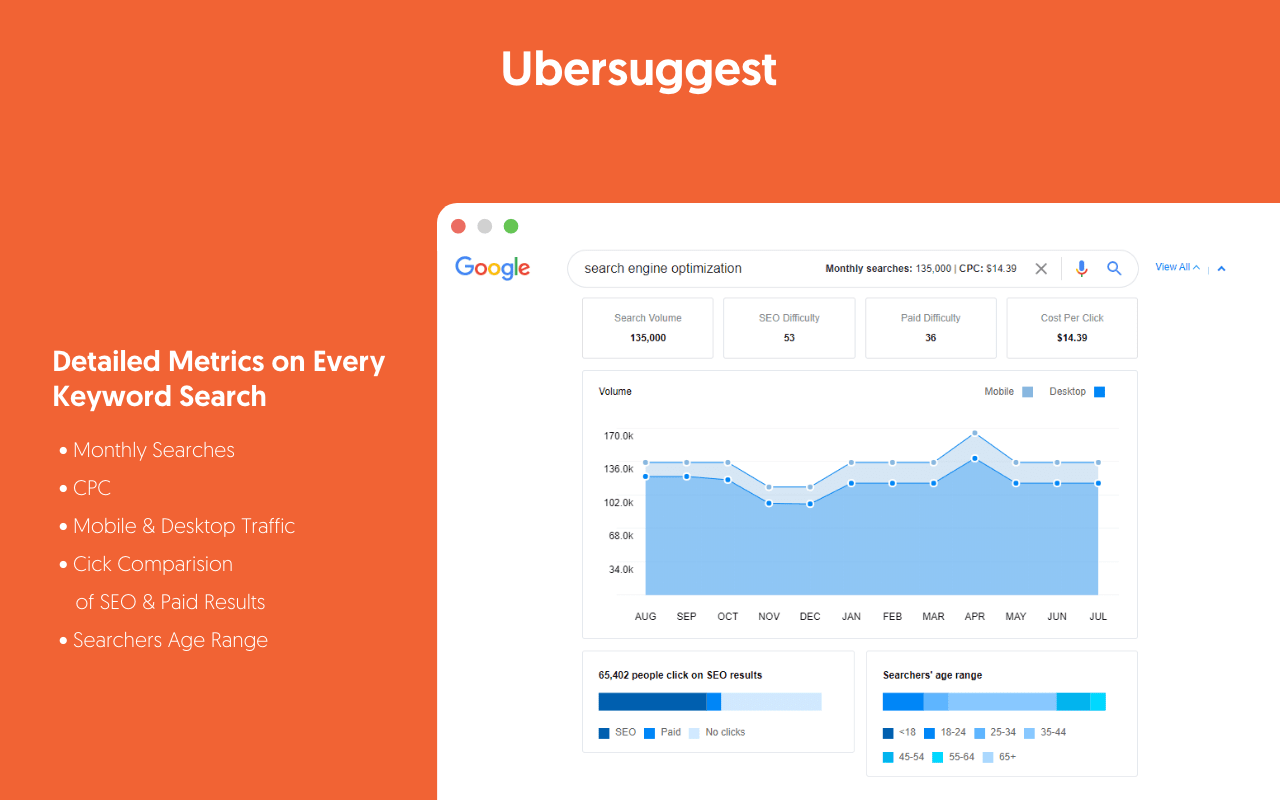
In the dynamic world of digital marketing, Search Engine Optimization (SEO) is a cornerstone for businesses aiming to enhance their online visibility and attract organic traffic. With countless SEO tools available, choosing the right one can be daunting. Ubersuggest, developed by renowned digital marketer Neil Patel, stands out as a versatile, user-friendly, and cost-effective solution. It offers a suite of features designed to simplify keyword research, competitor analysis, content ideation, and technical SEO, making it an excellent choice for businesses of all sizes.
This guide explores how Ubersuggest can revolutionize your SEO strategy. From uncovering high-potential keywords to analyzing competitors and optimizing your website, Ubersuggest provides actionable insights to boost your search engine rankings. Whether you’re a small business owner, a freelancer, or an experienced marketer, this tool can help you achieve measurable results. Let’s dive into how Ubersuggest can elevate your SEO efforts and drive more traffic to your website.
Ready to get started? Contact Sadekur Rahman to learn how we can tailor Ubersuggest’s insights to your business goals.
What is Ubersuggest?
Ubersuggest is a free and paid SEO tool created by Neil Patel, designed to make SEO accessible and effective for businesses, marketers, and freelancers. Launched initially as a keyword research tool, it has evolved into a comprehensive platform offering features like competitor analysis, content ideas, backlink analysis, and site audits. Its affordability and intuitive interface make it particularly appealing for small businesses and those new to SEO.
Key Features of Ubersuggest
- Keyword Research: Generates hundreds of keyword ideas, including long-tail variations, with data on search volume, cost-per-click (CPC), and competition levels.
- Content Ideas: Identifies top-performing content in your niche based on social shares and backlinks, inspiring high-impact content creation.
- Competitor Analysis: Provides insights into competitors’ SEO strategies, including their top pages, keywords, and backlink profiles.
- Backlink Analysis: Analyzes backlinks to your site or competitors’ sites, helping you identify link-building opportunities.
- Site Audit: Conducts technical SEO audits to uncover issues like broken links, slow pages, or duplicate content.
- Integration with Google Analytics: Combines SEO data with traffic insights for a holistic view of performance.
Ubersuggest offers a free version with limited features and paid plans starting at a fraction of the cost of premium tools like Ahrefs or SEMrush. Its lifetime plan is notably affordable, making it a cost-effective choice for budget-conscious users (Ubersuggest Official Website).
Keyword Research with Ubersuggest
Keyword research is the foundation of any successful SEO strategy, and Ubersuggest excels in providing actionable keyword insights. Its Keyword Ideas feature allows users to input a seed keyword and receive a list of related keywords, including long-tail variations, along with critical metrics.
How to Use Ubersuggest for Keyword Research
- Enter a Seed Keyword: Input a keyword relevant to your niche (e.g., “digital marketing”).
- Explore Keyword Types: Ubersuggest categorizes suggestions into:
- Related Keywords: Similar terms (e.g., “digital marketing strategies”).
- Questions: Query-based keywords (e.g., “What is digital marketing?”).
- Prepositions: Keywords with prepositions (e.g., “digital marketing for beginners”).
- Comparisons: Keywords comparing options (e.g., “digital marketing vs SEO”).
- Analyze Metrics: Review data for each keyword, including:
- Monthly Search Volume: Number of monthly searches.
- Average CPC: Cost-per-click for paid ads.
- SEO Competition: Difficulty of ranking organically.
- Filter and Sort: Use filters to focus on high-volume, low-competition keywords or specific regions.
- Check Trends: Examine search volume trends to identify seasonal or rising keywords.
Tips for Effective Keyword Research
- Target Long-Tail Keywords: These are less competitive and more likely to convert (e.g., “best SEO tools for small businesses”).
- Leverage Question Keywords: Create content that answers common queries to capture featured snippets.
- Monitor Seasonal Trends: Plan content around peak search periods for maximum impact.
For example, if you run a fitness blog, entering “weight loss” into Ubersuggest might reveal long-tail keywords like “weight loss tips for beginners,” which has moderate search volume and low competition, making it an ideal target.
By using Ubersuggest’s keyword research tools, you can identify high-potential keywords that align with your audience’s search intent, improving your chances of ranking higher on search engine results pages (SERPs).
Content Ideas and Inspiration
Creating engaging, high-quality content is essential for SEO success, and Ubersuggest’s Content Ideas feature helps you discover what resonates with your audience. By analyzing top-performing content in your niche, Ubersuggest provides insights into topics that drive traffic and engagement.
How to Use Ubersuggest for Content Ideas
- Input a Keyword: Enter a keyword related to your niche.
- Review Top Content: Ubersuggest displays a list of content pieces ranking well for that keyword, including estimated traffic, social shares, and backlinks.
- Analyze Performance Metrics: Focus on content with high social shares (e.g., Facebook, Pinterest) and backlinks, indicating popularity and authority.
- Identify Content Gaps: Look for topics your competitors haven’t fully covered or where you can offer a unique perspective.
- Create Superior Content: Develop content that is more comprehensive, visually appealing, or up-to-date than existing pieces.
Example
For a keyword like “keto diet,” Ubersuggest might show a blog post titled “10 Keto Diet Tips for Beginners” with high Pinterest shares. You could create a more detailed guide, such as “20 Keto Diet Hacks for Sustainable Weight Loss,” incorporating visuals and expert quotes to outshine the competition.
Why This Matters
- Social Shares: Popular content on social media can drive additional traffic and backlinks, boosting SEO.
- Backlinks: Content that attracts links from authoritative sites enhances your site’s authority.
- User Engagement: High-quality content keeps visitors on your site longer, reducing bounce rates and signaling relevance to search engines.
By leveraging Ubersuggest’s Content Ideas, you can create content that not only ranks well but also engages your audience, driving both traffic and conversions.
Competitor Analysis
Staying ahead in SEO requires understanding your competitors’ strategies, and Ubersuggest’s competitor analysis tools make this process straightforward. By analyzing competitors’ top pages, keywords, and backlinks, you can uncover opportunities to improve your own SEO performance.
How to Perform Competitor Analysis with Ubersuggest
- Enter a Competitor’s Domain: Input a competitor’s website URL into Ubersuggest.
- Explore Top Pages: View the pages driving the most organic traffic, along with the keywords they rank for.
- Analyze Keywords: Identify the keywords sending traffic to their site, focusing on those you could target to outrank them.
- Check Backlinks: Examine their backlink profile to see where they’re getting links and identify potential link-building opportunities.
- Use Domain vs Domain: Compare your site directly with a competitor’s to assess gaps in traffic, keywords, and backlinks.
Benefits of Competitor Analysis
- Discover Content Gaps: Find topics your competitors rank for but you don’t, allowing you to create targeted content.
- Identify Link-Building Opportunities: Reach out to sites linking to your competitors for potential backlinks.
- Benchmark Performance: Set realistic goals by comparing your site’s metrics with those of competitors.
For instance, if a competitor’s blog post on “SEO tools” ranks well, Ubersuggest can reveal the keywords driving its traffic, such as “best free SEO tools.” You can then create a more comprehensive post targeting similar keywords to compete for rankings.
Site Audit and Technical SEO
Technical SEO ensures that search engines can crawl and index your site effectively, and Ubersuggest’s Site Audit feature helps identify and fix issues that could hinder your rankings.
How to Conduct a Site Audit with Ubersuggest
- Enter Your Domain: Input your website’s URL into Ubersuggest.
- Run the Audit: The tool scans your site for issues like broken links, slow pages, or duplicate content.
- Review the Report: The audit provides a list of issues, categorized by severity (critical, warnings, recommendations), with actionable fixes.
- Prioritize Fixes: Address critical issues first, such as 404 errors or missing meta tags.
- Re-audit: After implementing fixes, run another audit to confirm improvements.
Common Issues Identified by Ubersuggest
- Broken Links (404 Errors): Disrupt user experience and crawling.
- Slow Page Load Times: Affect user satisfaction and crawl efficiency.
- Duplicate Content: Confuses search engines and dilutes rankings.
- Missing Meta Tags: Impacts on-page SEO and click-through rates.
- Mobile Usability Issues: Critical for Google’s mobile-first indexing.
- XML Sitemap Errors: Hinders search engine discovery of your pages.
Example
If Ubersuggest identifies 21 pages with low word count, you can prioritize updating those pages with more comprehensive content to improve their ranking potential.
By addressing these technical issues, you can enhance your site’s crawlability, indexability, and overall SEO performance.
Integrating Ubersuggest with Google Analytics
Integrating Ubersuggest with Google Analytics provides a deeper understanding of your website’s performance by combining SEO data with traffic and conversion metrics.
How to Integrate Ubersuggest with Google Analytics
- Link Accounts: In the Ubersuggest dashboard, connect your Google Analytics account.
- Access Combined Data: View Google Analytics metrics alongside Ubersuggest’s SEO data, such as keyword rankings and backlinks.
- Track Keyword Performance: Monitor which keywords drive traffic and conversions.
- Analyze Traffic Sources: Understand how SEO efforts contribute to overall traffic.
- Set Up Goals: Use Google Analytics to track conversions (e.g., form submissions, purchases) tied to your SEO campaigns.
This integration allows you to make data-driven decisions, ensuring your SEO strategies align with your business objectives.
Ubersuggest vs. Other SEO Tools
Ubersuggest is a powerful tool, but how does it compare to other popular SEO tools like Ahrefs, SEMrush, and Moz? Below is a comparison to help you decide if Ubersuggest is right for you.
Comparison of SEO Tools
| Tool | Strengths | Weaknesses | Pricing (Monthly) |
| Ubersuggest | Free version; user-friendly; affordable paid plans; good for beginners | Limited data depth; some features require paid plans | Free or $29–$99 |
| Ahrefs | Extensive backlink database; advanced keyword research; content explorer | High cost; steeper learning curve | $99–$999 |
| SEMrush | Comprehensive features (SEO, PPC, content marketing); large link index | Can be overwhelming for beginners | $119.95–$449.95 |
| Moz | Excellent keyword research; rank tracking; user-friendly interface | Limited backlink data; some features require add-ons | $99–$599 |
When to Choose Ubersuggest
- Budget-Conscious Users: Ideal for small businesses or freelancers due to its free version and affordable plans.
- Beginners: Its intuitiveმო�
FAQ Section
Q1: What is Ubersuggest, and how can it help with SEO?
A1: Ubersuggest is a free and paid SEO tool offering keyword research, competitor analysis, content ideas, backlink analysis, and site audits. It helps optimize websites by providing data-driven insights to improve search rankings and traffic.
Q2: How does Ubersuggest compare to other SEO tools like Ahrefs and SEMrush?
A2: Ubersuggest is more affordable and user-friendly, ideal for beginners and small businesses. It offers fewer features and less comprehensive data than Ahrefs (strong in backlink analysis) or SEMrush (broad digital marketing tools).
Q3: Is Ubersuggest suitable for small businesses or freelancers?
A3: Yes, Ubersuggest’s free version and affordable paid plans make it ideal for small businesses and freelancers seeking essential SEO features without high costs.
Q4: Can Ubersuggest be used for local SEO or international markets?
A4: Yes, Ubersuggest supports local SEO by targeting location-specific keywords and provides search volume data for different countries, aiding international SEO strategies.
Conclusion
Ubersuggest is a powerful, accessible tool that can significantly enhance your SEO strategy. Its features for keyword research, content ideation, competitor analysis, and technical SEO provide actionable insights to improve your search engine rankings and drive organic traffic. While it may not offer the depth of premium tools like Ahrefs or SEMrush, its affordability and ease of use make it an excellent choice for small businesses, freelancers, and beginners.
To maximize your SEO success, consider partnering with an expert like Sadekur Rahman. Our tailored SEO services can help you leverage tools like Ubersuggest to achieve measurable results. Don’t miss the opportunity to elevate your online presence contact us or book a meeting today to start your SEO journey.
Ready to Boost Your SEO?

Written by Sadekur Rahman
SEO & Website Strategy Specialist at Pixelvega and SEO Executive at Daily Amar Desh. 6+ years helping brands grow with data-driven SEO.